

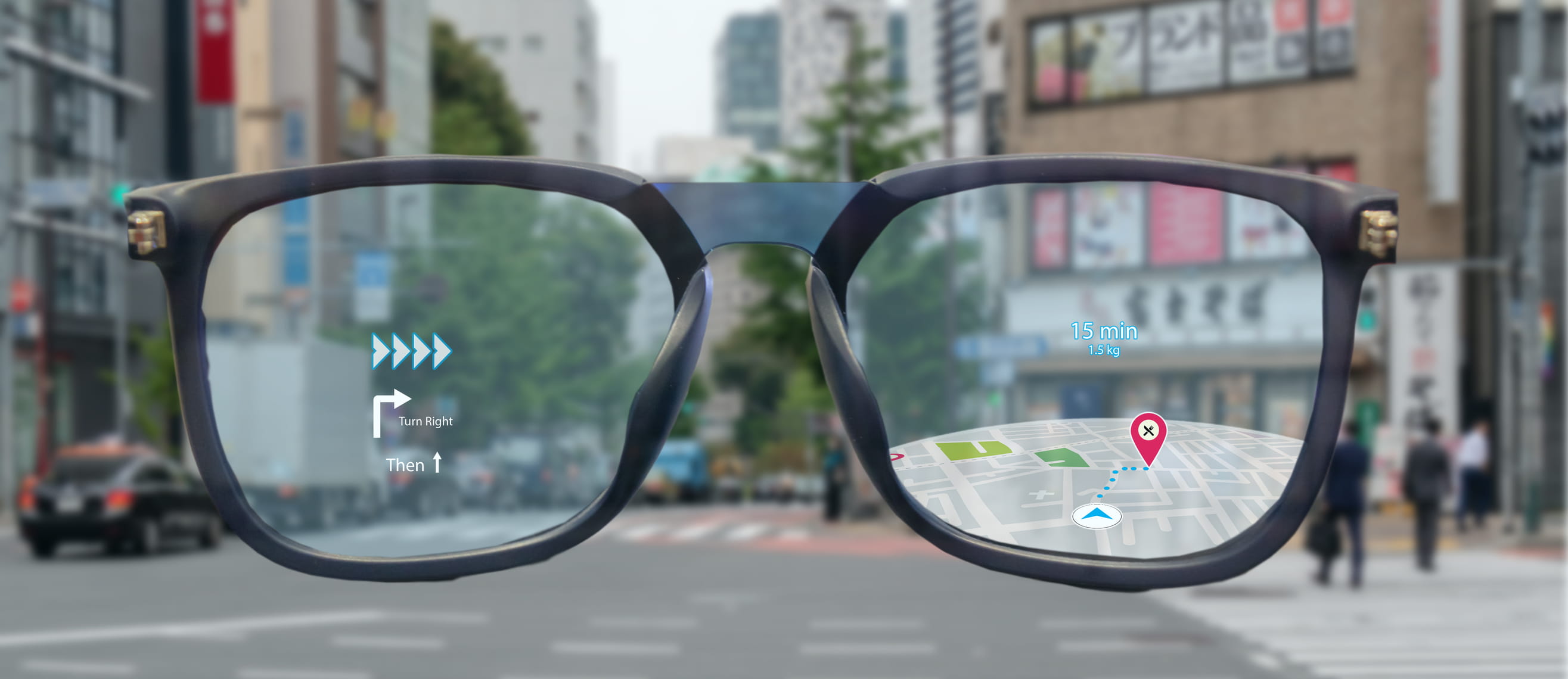
Brands are still exploring potential use cases for glass based devices, including near eye TV glasses, AI glasses, and AR glasses. Collectively, these fall under the “smart glasses” category. Near eye TV glasses function as wearable monitors, providing a near eye media experience for connected devices such as media boxes or smartphones. AI glasses (such as Ray Ban Meta) are essentially regular glasses equipped with connectivity that enables AI assistance via a paired phone. Ray Ban Meta is the first widely adopted smart glasses product, surpassing 2 million units sold.
Smart glasses device and application trends
There is no strict definition separating the two (AI and AR glasses), but the key distinction lies in the presence of a micro display. In essence, AR glasses are AI glasses that also include a micro display (such as liquid crystal on silicon, OLED on silicon (OLEDoS), and LED on silicon (LEDoS)) to overlay AR content. Near eye TV glasses are not designed for walking or everyday use, whereas AI glasses and AR glasses are intended to be worn like normal eyewear, offering enhanced smart features. Users mostly use near eye TV glasses indoors for entertainment, and content sources can range from smartphones to PCs and TVs, among others. Because they are typically used indoors, where ambient-light interference is lower, the performance requirements for micro displays are generally less demanding.
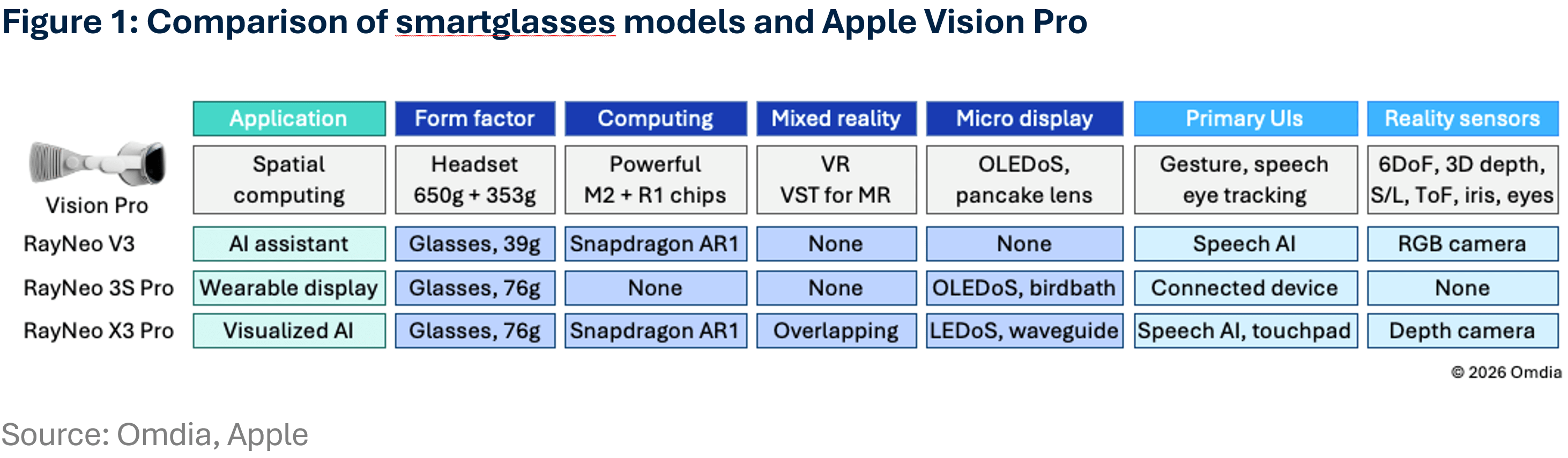
Compared with headset style devices, the glasses’ form factor is lighter, but that weight reduction comes at the expense of sensors, computing capability, and overall feature richness. Apple Vision Pro is an outstanding mixed reality (MR) device featuring spatial computing, but it is very heavy (the headset is 650g, and the external battery pack is 353g) and not comfortable for long-term use. It can offer a video-see-through (VST)-based MR experience and support intuitive user interfaces, such as gesture sensing and eye tracking, reducing reliance on touch or handheld controllers. However, the overall volume and weight are far less acceptable because the device must accommodate numerous sensors and key components. In contrast, smart glasses devices prioritize comfort and long term wearability.
Most smart glasses devices weigh between 50g and 100g, and they are designed to look and be worn like normal eyewear. Because of the form factor constraints, these products sacrifice certain functions and performance, instead prioritizing their core advantages. Unlike the Apple Vision Pro, which supports gesture and eye tracking interfaces, most AI and AR glaSsses rely on simpler input methods that do not require complex tracking systems, typically speech commands or a touchpad on the arm of the glasses. Near eye TV glasses, by contrast, are controlled through the connected device, such as a smartphone (see Figure 1).
Design and specification trade-offs for smartglasses
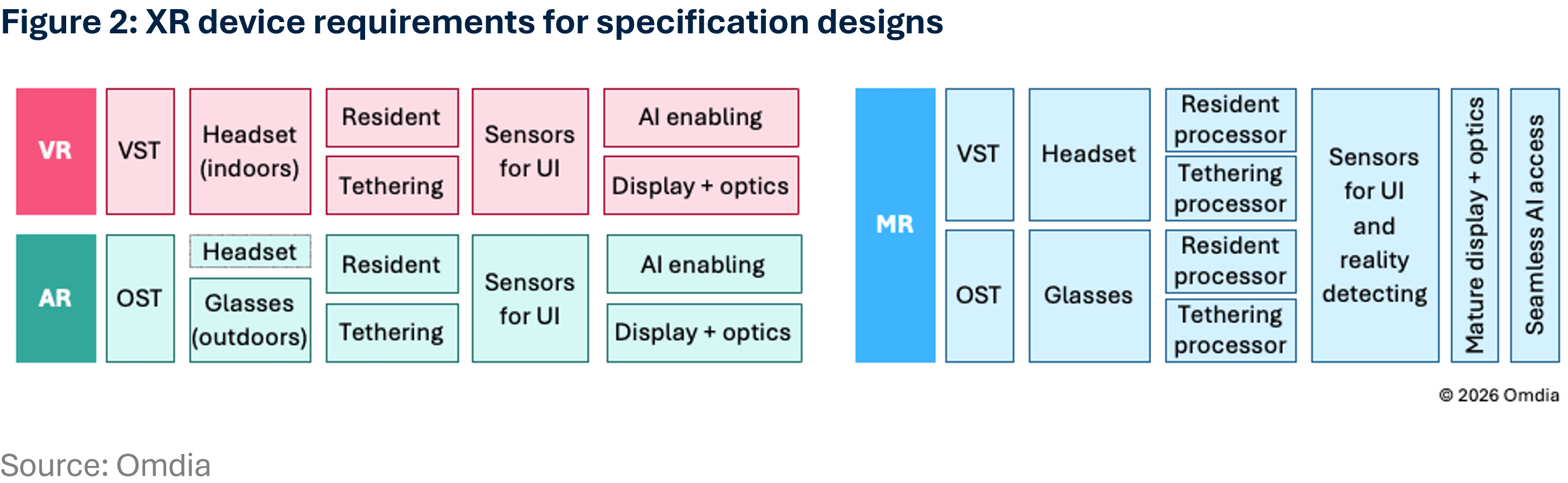
Equipping many sensors is quite challenging in smartphones, not to mention wearable XR devices. Compromises and trade-offs are inevitable. Functionality is related to the components equipped, and high performance usually means higher power consumption and a larger battery. Unlike a phone in a handheld form factor, XR devices must consider comfort for long term wearing. VR devices (including VST based MR such as Vision Pro) use a headset design with full occlusion, so the larger form factor allows more components inside. This is not acceptable for smart glasses or AR based applications. Microsoft HoloLens was an advanced pioneer in AR, but it was not accepted.
Most devices for OST based applications are forced to make trade offs in functionality, so the phone - with higher computing performance and longer battery life - acts as the primary enabler in tethered mode. Only the essential components (such as the processor, micro display, and optical elements) remain on-device to reduce weight and volume. VST based devices can achieve better specifications, but they are not well suited to long-term use. This predicament will not be solved until more advanced semiconductor node processes and packaging technologies can further shrink the form factor (see Figure 2).
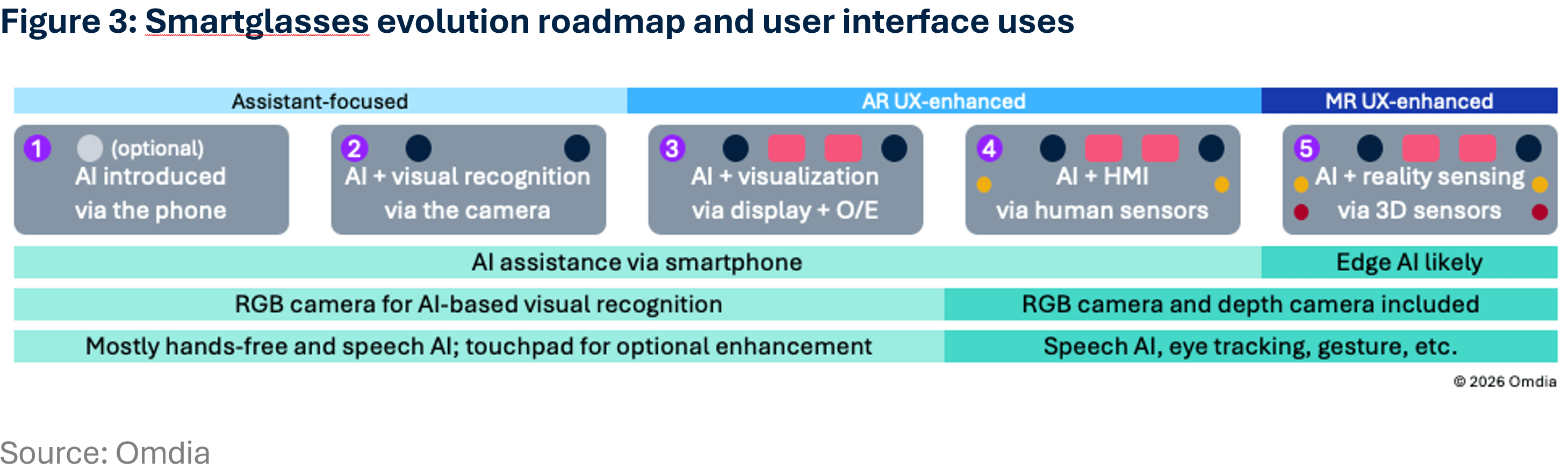
Speech with AI assistance is likely to be the most effective user interface for AI and AR glasses—especially when considering real world use scenarios. Although equipped with the Snapdragon AR1, Ray Ban Meta glasses must connect to a smartphone via Bluetooth for full use. The built in microphone acts only as a receiver, with AI access routed through the phone. However, video recording can be performed independently using the glasses alone. AI and AR glasses serve as front-end devices for phone based AI access, enabling hands free interaction. The smartphone acts as a key enabler, enhancing the user interface experience for these smart glasses devices. Some models with built in cameras also support video recording and AI based visual recognition.
When micro display technologies mature, particularly in cost, form factor, and outdoor usable brightness, AR glasses will become more affordable and more widely adopted. Micro displays enable AI interactions and information presentation to be visualized directly, which is something AI glasses without displays cannot do. Although today’s AR experience is essentially an optical see through overlay of digital content on the real world, it is already proving useful. Adding more sensors would further enhance intuitive user interfaces and environmental awareness, but this will not be practical until semiconductor technologies advance enough to support such integration.
More from author


More insights
Assess the marketplace with our extensive insights collection.
More insightsHear from analysts
When you partner with Omdia, you gain access to our highly rated Ask An Analyst service.
Hear from analystsOmdia Newsroom
Read the latest press releases from Omdia.
Omdia NewsroomSolutions
Leverage unique access to market leading analysts and profit from their deep industry expertise.
Solutions
